
 English
 中文简体
中文简体 English
 Русский
 Español
 Português
 Türkçe
 العربية
 Deutsch
 Polski
 Italiano
 Français
 한국어
한국어 ไทย
ไทย Tiếng Việt
 日本語
日本語

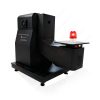



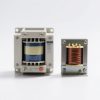








Voltage Transformer
User's Manual
Applicable LISUN models: ETUS-SP2K、ETUS-SP5K、ETUS-TP10K、ETUS-TP20K、ETUS-TP30K、ETUS-TP40K、ETUS-TP50K、ETUS-TP60K、ETUS-TP80K
1. Basic Understanding of Equipment
1.1 Product Overview
1.1.1 Model Classification
| LISUN Model | Input Voltage | Output Voltage | Power |
|---|---|---|---|
| ETUS-SP2K | Single-phase, one live wire and one neutral wire / 110V | Single-phase with one live wire, one neutral wire, and one ground wire / 220V | 2 kVA |
| ETUS-SP5K | Single-phase, one live wire and one neutral wire / 110V | Single-phase, one live wire, one neutral wire, one ground wire / 220V | 5 kVA |
| ETUS-TP10K | Three-phase, three-wire system / 220 V line-to-line voltage | Three-phase, three live wires, one neutral, and one ground/line-to-line voltage of 380 V | 10 kVA |
| ETUS-TP20K | Three-phase, three-wire system / 220 V line-to-line voltage | Three-phase, three live wires, one neutral, and one ground/line-to-line voltage of 380 V | 20 kVA |
| ETUS-TP30K | Three-phase, three-wire system / 220 V line-to-line voltage | Three-phase, three live wires, one neutral, and one ground/line-to-line voltage of 380 V | 30 kVA |
| ETUS-TP40K | Three-phase, three-wire system / 220 V line-to-line voltage | Three-phase, three live wires, one neutral, and one ground/line-to-line voltage of 380 V | 40 kVA |
| ETUS-TP50K | Three-phase, three-wire / 220 V phase-to-phase voltage | Three-phase, three live wires, one neutral, and one ground/line-to-line voltage of 380 V | 50 kVA |
| ETUS-TP60K | Three-phase, three-wire / 220 V phase-to-phase voltage | Three-phase, three live wires, one neutral, and one ground/line-to-line voltage of 380 V | 60 kVA |
| ETUS-TP80K | Three-phase, three-wire system / 220 V line-to-line voltage | Three-phase, three live wires, one neutral, and one ground/line-to-line voltage of 380 V | 80 kVA |
Note: When selecting a Voltage Transformer, ensure that its usage does not exceed 80% of its rated power. For example, if your load is 10 kW, you should select the ETUS-TP20K (20 kVA output).
1.1.2 Product Applications
The ETUS series of Voltage Transformers is a line of professional-grade voltage conversion equipment introduced by LISUN GROUP, divided into two main categories: single-phase step-up Voltage Transformers (SP series) and three-phase step-up Voltage Transformers (TP series). This series of products can step up low-voltage mains power from regions such as the United States and Japan (single-phase 110V/120V, three-phase 220V) to Chinese standard voltages (single-phase 220V, three-phase 380V). The output voltage stability matches that of the input, making them suitable for a wide range of applications, including powering imported equipment, laboratory testing, and industrial production.
This series of Voltage Transformers can be used in conjunction with the ITEU series of Isolation Transformers to provide a clean, stable power supply for precision test instruments.
1.2 Unboxing Inspection and Configuration Verification
1.2.1 Unpacking and Visual Inspection
When unpacking the device, handle it gently to avoid scratching the outer casing with sharp tools. After unpacking, first inspect the exterior of the device to ensure there is no visible deformation or dents, and that the buttons are not damaged or loose. If you notice any abnormalities with the device, please contact us immediately.
1.2.2 Downloading Electronic Documents
Download links for the digital user manual, warranty card, calibration certificate, and other documents have been sent via email. Please download them as soon as possible. If you missed the email, please feel free to contact us to request the download links again.
2. Safety Precautions
2.1 General Safety Guidelines
This equipment should only be wired and operated by personnel with basic knowledge of electrical work. Non-professionals should not disassemble or modify it without authorization.
Before use, be sure to verify that the local power grid voltage matches the device’s rated Input Voltage; connecting to the wrong voltage may cause permanent damage to the device.
High voltage is present inside the equipment while it is operating. Do not open the equipment enclosure under any circumstances to prevent electric shock.
Do not place any objects on the device to avoid blocking the ventilation openings.
If the device emits an unusual odor, makes unusual noises, or emits smoke, immediately disconnect the input power supply, stop using the device, and contact customer service.
2.2 System Requirements
Indoor Use: This device is intended for use only in dry indoor environments. Do not place it outdoors or use it in environments where it may be exposed to rain or water splashes.
Temperature Requirements: The ambient temperature should be maintained between -10°C and 40°C. Avoid placing the device near heat sources or in direct sunlight.
Ventilation and Heat Dissipation: A ventilation clearance of at least 20 mm must be maintained around the equipment. Do not cover the sides or top of the equipment—where heat is dissipated—with fabric, cardboard boxes, or similar materials.
Placement Requirements: Place the unit on a flat, stable, hard surface to prevent tilting or vibration; do not place it on carpets, soft pads, or other surfaces that are flammable or that obstruct heat dissipation.
Humidity and Dust: Avoid using in environments with high humidity, high dust levels, or corrosive gases.
2.3 Electrical Safety Standards
An air circuit breaker or fuse rated for the device’s input power must be installed on the input side to provide front-end protection.
Wiring must be secure and reliable; terminal connections should be tightened to prevent loose connections that could cause overheating or arcing.
The equipment must be reliably grounded, and the grounding resistance must comply with the requirements of national electrical safety standards.
The cross-sectional area of the input and output cables must meet the rated current requirements to prevent cable overload and overheating.
Before plugging in or unplugging the power supply or making any connections, you must ensure that the power source at the front end has been completely disconnected.
2.4 Safety Precautions During Operation
Do not exceed the rated power under any circumstances; the total load power must not exceed 80% of the equipment’s rated power. Prolonged operation at full load will accelerate equipment wear and tear and shorten its service life.
Never short-circuit the output terminals; doing so may cause serious damage to the equipment or even result in a fire.
Do not plug in or unplug load cables while the equipment is running; turn off the equipment or turn off the load switch first.
Do not allow foreign objects such as metal shavings, screws, or wire ends to fall into the equipment to prevent internal short circuits.
Before cleaning the equipment, you must unplug the input power supply cord or turn off the circuit breaker at the input power supply. Do not clean the equipment while it is still energized.
3. Equipment Operation and Use (Using the ETUS-SP as an Example)
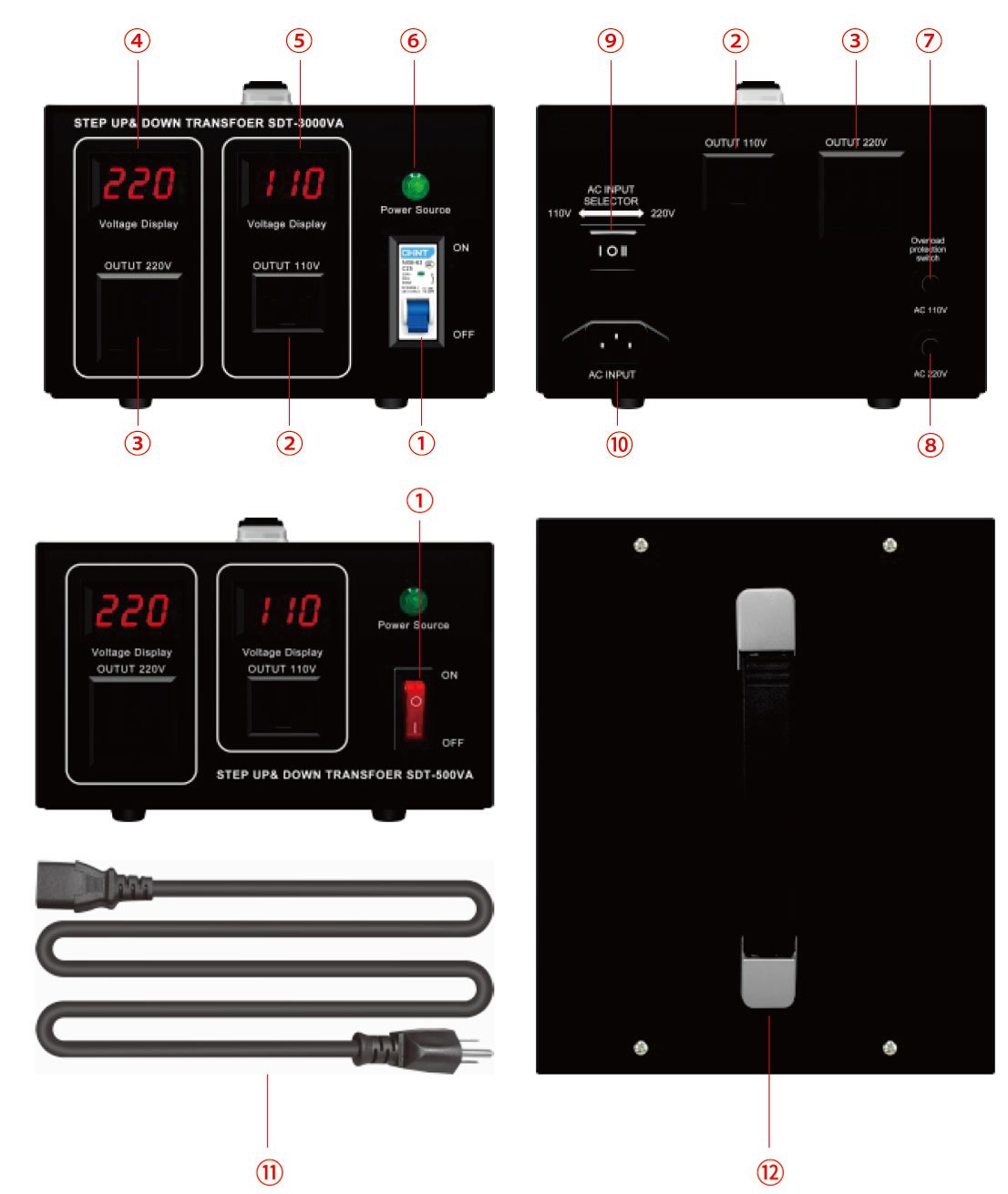
3.1 Equipment Appearance and Wiring Instructions
See Figure 3-1.
| Number | Note |
|---|---|
| ① | To turn the unit on, slide the circuit breaker switch upward to the ON position; to turn it off, slide it downward to the OFF position. Low-power models use push-button circuit breakers, while high-power models use air-break circuit breakers. |
| ② | 110V output outlet; the actual output voltage varies with Input Voltage |
| ③ | 220V output outlet; the actual output voltage varies with Input Voltage |
| ④ | Display the real-time output voltage of Outlet 3 |
| ⑤ | Display the real-time output voltage of Outlet 2 |
| ⑥ | Power Indicator Light: When the Voltage Transformer is operating normally, the power indicator light remains on; if it goes out, it indicates a power outage or that a protective action has been triggered. |
| ⑦ | 110V Output Overload Reset Switch: To restore power, reduce the load power to within the rated power range, then press the overload reset switch. When the load power reaches 100% of the rated power, the circuit breaker trips within 10 minutes; when the load power reaches 150% of the rated power, the circuit breaker trips within 10 seconds. |
| ⑧ | For the 220V output overload reset switch, reduce the load power to within the rated power range, then press the overload reset switch to restore power. When the load power reaches 100% of the rated power, the circuit breaker trips within 10 minutes; when the load power reaches 150% of the rated power, the circuit breaker trips within 10 seconds. |
| ⑨ | Input Voltage Selector Switch: When using the device in countries with a 110–120 V power supply, such as the United States, select the 110 V setting; when using the device in countries with a 220–240 V power supply, such as China, select the 220 V setting. |
| ⑩ | Power Cord Connection Port |
| ⑪ | Power Cord |
| ⑫ | Handle for easy transport and movement of the equipment |
3.2 Standard Power-On and Power-Off Procedures
| Steps | Note |
|---|---|
| ① | Make sure the equipment’s power switch is in the OFF position, and make sure the load switch is in the OFF position. |
| ② | Turn on the front-panel power switch to provide input power supply for the device. |
| ③ | Push the power switch on the front panel of the device upward to the ON position to turn it on. Check to see if the power indicator light is on and if the output voltmeter displays a normal reading. |
| ④ | When powering on the device for the first time or using it for the first time after a long period of storage, it is recommended to let it run idle for 3 minutes to check for any unusual noises, odors, or excessive heat. |
| ⑤ | After confirming that everything is normal, gradually turn on the load devices. We recommend turning on the lower-power loads first, followed by the higher-power loads. |
| ⑥ | When it is necessary to shut down the system, first turn off the power switches for all load devices one by one. |
| ⑦ | Slide the device’s power switch down to the OFF position. |
| ⑧ | Turn off the circuit breaker for the front-end input power supply (do this when the unit will not be used for an extended period) |
4. Routine Maintenance and Care
4.1 Routine Inspection Items
Conduct a quick visual inspection before and after each use, checking the following: whether the equipment housing is clean and free of water stains or foreign objects; whether the power cord is intact and free of damage or signs of aging; whether there are signs of overheating or discoloration at the terminal blocks; whether the ventilation and heat dissipation openings are blocked by dust or debris; whether the equipment is placed on a stable surface and shows no signs of tilting or shifting;
4.2 Items to Be Inspected on a Regular Basis
It is recommended that a professional electrician perform a comprehensive maintenance check on a regular basis: Open the enclosure to inspect the condition of the internal windings, terminal blocks, and protective components; clean out accumulated dust inside, and check the insulation for signs of aging or cracking; measure the DC resistance of the Voltage Transformer windings to determine whether there are any turn-to-turn short circuits; verify that the operating thresholds of the overload protection devices are accurate; and tighten all internal terminal blocks and connecting bolts.
4.3 Long-Term Storage Requirements
Before storing the equipment for an extended period, it should be thoroughly cleaned and ensured to be dry and free of moisture.
The storage area should be well-ventilated, dry, and dust-free, and should be kept away from high temperatures, high humidity, and corrosive gases.
The equipment should be stored in its original packaging or covered with a dust cover to prevent dust buildup.
During storage, power on the unit once every 3 months and run it under no-load conditions for 30 minutes to remove internal moisture.
Before using the device again after a long period of storage, perform the checks and warm-up procedures as part of the initial startup process.
5. Troubleshooting and Resolving Common Problems
5.1 Faults Involving Absence of Output Voltage
| Fault Symptoms | Possible Causes | Procedure |
|---|---|---|
| The indicator light is off; there is absolutely no output. | The input power supply is not plugged in properly, or the circuit breaker is not turned on. | Check the input power supply, plug the power cord back in, and close the front-end circuit breaker. |
| The indicator light is off; there is absolutely no output. | Internal break in the input power supply cord | Replace the input power supply cord, or use a multimeter set to the continuity test mode to check the cable. |
| The indicator light is off; there is absolutely no output. | The device’s power switch is not set to the ON position | Push the power switch upward to the ON position. |
| The indicator light is off; there is absolutely no output. | Severe overloading or a short circuit caused the circuit breaker to trip. | Disconnect all loads, press the reset button, or reclose the circuit; do not use the equipment until the short-circuit fault has been cleared. |
5.2 Output Anomaly-Related Faults
| Fault Symptoms | Possible Causes | Procedure |
|---|---|---|
| Output voltage is too high or too low | Fluctuations in the mains voltage itself | This is normal; the output follows changes in the input. If the deviation is too large, check Input Voltage |
| The voltmeter reading does not change, and the buttons do not respond. | The display circuit briefly froze. | Unplug the input power supply, wait 30 seconds, and then plug it back in. |
| The voltage drops significantly when a load is applied | The load power is too high and exceeds the rated range. | Reduce the number of connected devices, or replace the Voltage Transformer with a higher-wattage one. |
| The noise level of the equipment has increased significantly | Overload or loose core | Reduce the load; if the noise is still noticeable when the machine is unloaded, please contact customer service. |
5.3 Faults Related to Protective Device Operation
| Fault Symptoms | Possible Causes | Procedure |
|---|---|---|
| A sudden power outage occurred during use, causing the circuit breaker to trip. | Total load power exceeds the rated value | Shut down some of the load equipment to reduce the total power; reset the circuit breaker and then restart the system. |
| The circuit breaker trips immediately upon startup. | Output short circuit or internal short circuit in the load | Disconnect all loads and test the Voltage Transformer individually; troubleshoot for short circuits in the loads and wiring. |
| The circuit breaker trips after some time of use | Prolonged operation near full load, overheat protection | Reduce the load and ensure proper ventilation and heat dissipation; once the equipment has cooled down, reset it and resume use. |
| The circuit breaker trips frequently, even though the load isn’t very heavy. | Abnormal Input Voltage or protection device failure | Check Input Voltage; if the voltage is normal but the circuit breaker continues to trip frequently, please contact customer service for repair. |